You are looking for a production schedule template in Excel?
Understandable. Excel is fast, cheap and almost anyone can work with it. Within a few hours you have a schedule up and everything seems under control.
But here’s exactly the problem. Because Excel works, until your production becomes more complex. And you reach that point faster than you think.
In this blog, we explain:
- What is a production schedule template in Excel
- why it is so popular
- where things go wrong
- and what you need to really optimize your planning
What does a template in Excel offer?
A production schedule (or production planning) template in Excel is a spreadsheet that you use to manually plan production orders, resources and timelines.
Typical features:
- Gantt charts or timelines
- manual order entry
- simple formulas for planning
- overview of capacity and resources
For many companies, this is the first step toward structured production planning.
Why Excel templates are so attractive
It’s not hard to see why so many companies start with Excel:
- Free or cheap
- Quick to implement
- Flexibly adaptable
- No training required
For small productions or low complexity, this often works fine. But those advantages quickly become disadvantages once you grow.
Excel’s hidden limitations for production planning
1. No real-time updates
Every change must be made manually. Therefore, a rush order, machine failure or delay means immediate extra work.
By the time your schedule is adjusted, it is often incorrect.
2. No understanding of your factory
Excel calculates, but understands nothing.
It does not take into account, for example:
- machine capacity
- competencies of employees
- dependencies between orders
- changeover times
- bottlenecks
As a result, your planning seems logical – but is often not feasible in practice. Buffers are therefore built in, but they in turn cause sub-optimization.
Or Excel schedules are increasingly customized to do take into account specific situations and dependencies. They often become complex Excel sheets with formulas and references that only the planner who created them knows. The result is a great dependence on one person.
3. Error-prone and vulnerable
One wrong formula or input can disrupt your entire schedule.
In addition:
- several versions circulate
- no one knows what “the right one” is
- errors often go unnoticed
4. Not scalable
Excel works at:
- few orders
- few variables
- simple processes
But as soon as you grow, chaos ensues:
- more products
- more machines
- more dependencies
Complexity grows exponentially – Excel does not.
5. No scenario planning (the real bottleneck).
In production planning, it is not about making one schedule.
It’s all about comparing multiple scenarios and choosing which is best.
For example:
- What if order A is given priority?
- In which scenario do I have the missed waste?
- What is the best alternative when a machine fails?
- How do you minimize the number of human actions?
With Excel, this is practically impossible to do. Everything has to be done manually.
6. No digital twin and no AI optimization
For true optimization, you need more than a spreadsheet.
You need a Digital Twin of your factory: a digital representation that includes all processes, machines and constraints.
Based on that, AI can automatically generate and compare thousands of planning scenarios in seconds.
This enables:
- instantly find the best planning
- continuously optimize
- Respond faster to changes
Excel simply cannot do this.
 Want to understand how this works? Then read:
[https://planwisely .ai/digital-twin-ai-productieplanning /](https://planwisely.ai/digital-twin-ai-productieplanning/)
7. No real optimization
Excel helps you create a schedule. But not to optimize it.
You continue to depend on:
- manual choices
- experience
- knowledge of the excel sheet itself
- trial-and-error
Whereas modern systems do this automatically.
When Excel does still work
To be honest: Excel definitely has a place.
It works well with:
- small production environments
- few orders
- low complexity
- few dependencies
But once you grow, it becomes a brake instead of a tool.
The tipping point: when Excel is working against you
Do you recognize this?
- Your planners are primarily concerned with adjusting
- Delivery dates become unreliable
- You are constantly putting out fires
- The shop floor no longer follows the schedule
Then you have outgrown Excel.
The alternative: Advanced Planning & Scheduling (APS)
Where Excel stops, APS begins.
An APS system:
- takes into account all constraints
- plants automatically
- works with real-time data
- calculates scenarios
And when combined with a digital twin and AI, you go one step further:
You continuously optimize your production.
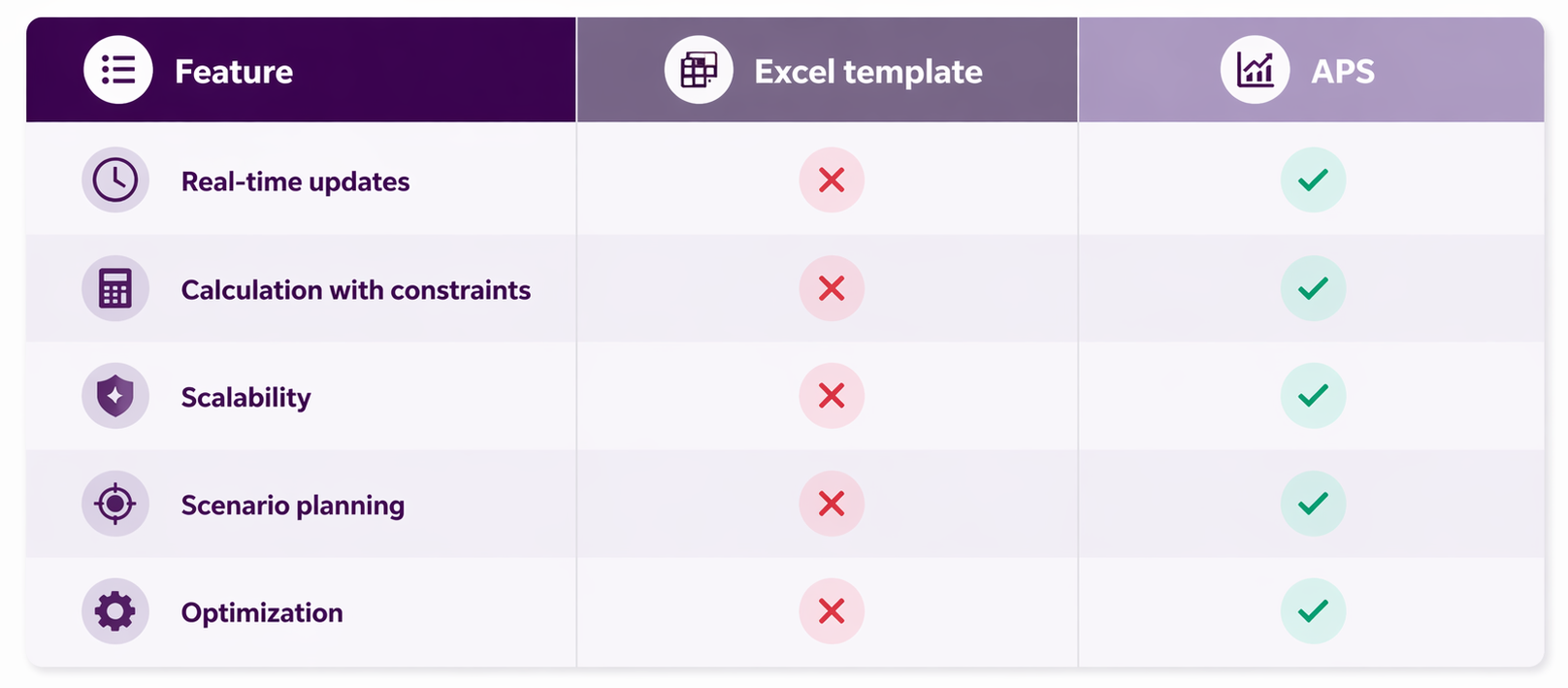
Excel vs. APS